Description
A small Python downloader for Archive.org file lists.
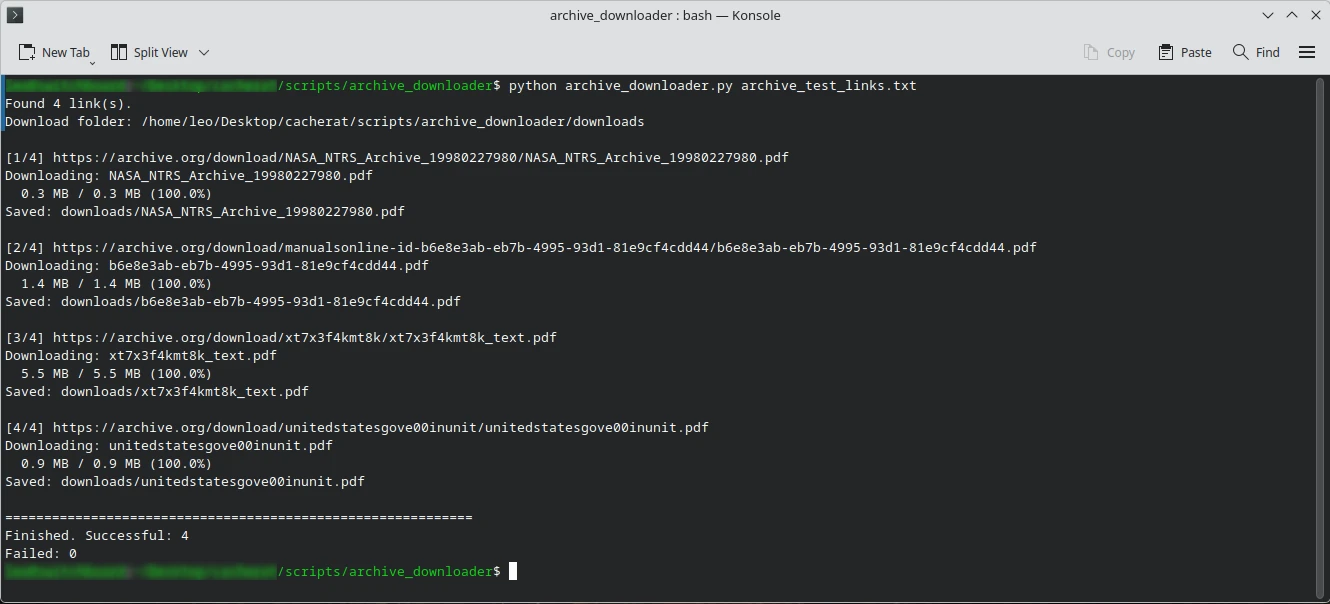
Give it a text file containing one direct URL per line. It walks through the list and puts the files into a local downloads/ directory.
That’s basically the whole machine.
No pip install. No dependency pile. No framework somebody will abandon six months from now. It uses the Python standard library.
Example:
python3 archive_downloader.py links.txtYour input file looks like this:
https://archive.org/download/example/file1.pdf
https://archive.org/download/example/file2.zip
https://archive.org/download/example/file3.txt
The script handles them sequentially.
What it does
- Reads one URL per line
- Ignores blank lines
- Creates
downloads/automatically - Follows normal HTTP redirects
- Downloads in 1 MB chunks
- Shows progress when file size is available
- Uses a 60-second network timeout
- Waits one second between downloads
- Continues when an individual URL fails
- Records failures in
failed_downloads.txt - Avoids overwriting an existing filename
- Works with ordinary Python 3
If manual.pdf already exists, the next copy becomes:
manual_2.pdfBetter than silently stomping on the first one.
Included
archive_downloader.py
README.md
archive_test_links.txt
archive_downloader.py is the downloader itself.
README.md explains setup, URL formatting, failures, direct Archive.org links, duplicate handling, Linux execution, and the rest of the small amount of machinery involved.
archive_test_links.txt gives you a ready-made sample list so you can verify the downloader before feeding it a giant collection.
Requirements
Python 3.
That’s it.
The script uses only:
os
sys
time
urllib.parse
urllib.request
pathlib
No Requests library. No BeautifulSoup. No package manager.
Made for direct Archive.org files
This is meant for URLs such as:
https://archive.org/download/IDENTIFIER/FILENAME.pdfIt does not scrape an Archive.org item page and decide what files you want.
Feed it direct file links.
It downloads direct file links.
Nice when software knows its job.
Failed downloads
One dead URL doesn’t kill a 300-file run.
Failures are collected in:
downloads/failed_downloads.txtwith the URL and Python’s reported error.
Fix the bad links later and run them again.
Important limitation
The script deliberately does not overwrite existing downloads.
If you run the same source list twice against the same folder, duplicate filenames may be created with numbered suffixes.
Check the directory before repeatedly firing the thing into the same pile.
Rights
This tool downloads URLs supplied by the user.
Archive.org hosting something does not automatically grant redistribution or commercial-use rights to the material. Check the rights attached to whatever you’re downloading separately.
The downloader is a tool. Copyright law remains stubbornly outside the Python standard library.